Many people get confused about the difference between 1080p and 4K when buying a TV, monitor, smartphone, gaming console, or streaming device.
Both are video resolutions, but they offer very different levels of image quality, sharpness, and viewing experience.
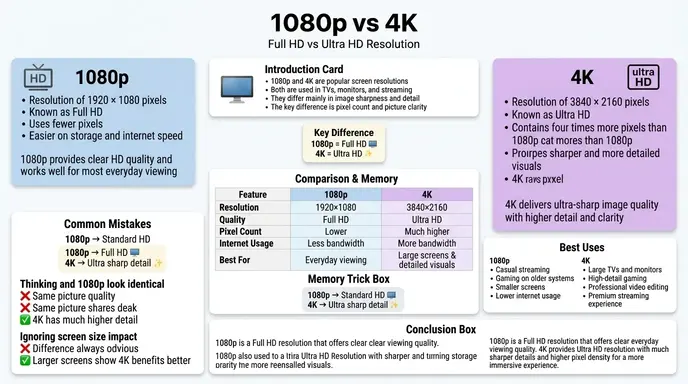
The difference between 1080p and 4K mainly comes down to pixel count and picture clarity. A 4K display contains far more pixels than a 1080p display, which makes the image sharper, more detailed, and clearer, especially on larger screens.
For example:
- 1080p resolution = 1920 × 1080 pixels
- 4K resolution = 3840 × 2160 pixels
That means 4K has about four times more pixels than Full HD 1080p.
Today, companies, and streaming platforms heavily promote 4K content because viewers increasingly prefer higher image quality.
In this guide, you will learn:
- What 1080p and 4K mean
- The exact differences between them
- Which resolution is better for gaming, streaming, and everyday use
- Real world viewing examples
- Common mistakes buyers make
- If upgrading to 4K is worth it in 2026
By the end, you will clearly understand the difference between 1080p and 4K and know which one fits your needs best.
Quick Answer: Difference Between 1080p and 4K
The difference between 1080p and 4K is that 4K resolution has four times more pixels than 1080p, resulting in sharper images, better detail, and improved clarity.
Simple Example
- 1080p = Full HD quality
- 4K = Ultra HD quality with much higher detail
In practical use:
- 1080p is usually enough for smaller screens and basic viewing.
- 4K is better for large TVs, gaming, professional editing, and high quality streaming.
Definition of 1080p and 4K
What Is 1080p?
1080p, also called Full HD (FHD), is a display resolution of:
1920 \times 1080
The “p” means progressive scan, where all image lines refresh together for smoother visuals.
Example
Most standard YouTube videos and older HDTVs use 1080p resolution.
What Is 4K?
4K, also called Ultra HD (UHD), is a display resolution of:
3840 \times 2160
It delivers significantly more detail and sharper visuals.
Example
Modern smart TVs, PlayStation 5 games, and Netflix premium streaming commonly use 4K.
Pronunciation of Both Terms
| Term | US Pronunciation | UK Pronunciation |
| 1080p | ten eighty pee | ten eighty pee |
| 4K | four kay | four kay |
Now let’s understand the deeper difference between 1080p and 4K in real world usage.
Comparison Table: Difference Between 1080p and 4K
| Feature | 1080p | 4K |
| Resolution | 1920 × 1080 | 3840 × 2160 |
| Pixel Count | About 2 million pixels | About 8 million pixels |
| Image Sharpness | Good | Extremely sharp |
| Video Quality | Full HD | Ultra HD |
| Streaming Requirement | Lower internet speed | Faster internet needed |
| Gaming Performance | Easier on hardware | Requires stronger GPU |
| Screen Size Suitability | Small to medium screens | Medium to large screens |
| Storage Usage | Smaller file sizes | Larger file sizes |
| Price | More affordable | Usually more expensive |
| Best For | Casual viewing | Premium viewing experience |
Key Differences Explained Between 1080p and 4K
4K Has Four Times More Pixels
The biggest difference is pixel density.
1080p Resolution
1920 \times 1080 \approx 2\ \text{million pixels}
4K Resolution
3840 \times 2160 \approx 8\ \text{million pixels}
More pixels mean more detail and sharper visuals.
4K Looks Better on Large Screens
On small displays like phones, the difference may not always be obvious.
But on:
- 55 inch TVs
- gaming monitors
- large projectors
4K looks noticeably clearer.
1080p Requires Less Internet Speed
Streaming 1080p videos uses less bandwidth.
Example
- 1080p streaming may require around 5 Mbps
- 4K streaming may require 15–25 Mbps
That is why platforms like Netflix and YouTube recommend faster internet for 4K streaming.
4K Needs More Powerful Hardware
Gaming in 4K requires stronger graphics cards and processors.
Modern GPUs are designed specifically to handle 4K gaming smoothly.
1080p Is More Affordable
1080p TVs, monitors, and laptops usually cost less than 4K versions.
This makes Full HD a practical choice for budget users.
4K Offers Better Future Proofing
Most new streaming content, gaming consoles, and premium devices now focus on 4K support.
Buying 4K today often gives longer long term value.
File Sizes Are Larger in 4K
Because 4K contains more detail, video files become much larger.
Example
- A 1080p movie may use 3–5 GB
- A 4K version may use 15–30 GB or more
Difference and Similarity Table Between 1080p and 4K
| Feature | 1080p | 4K | Similarity |
| Purpose | High definition viewing | Ultra high definition viewing | Both are video resolutions |
| Video Quality | Sharp | Extremely detailed | Both improve viewing experience |
| Device Support | Older and newer devices | Mostly newer devices | Both work on TVs and monitors |
| Streaming Use | Common worldwide | Increasingly popular | Both supported by YouTube and Netflix |
| Gaming Compatibility | Easier to run | Hardware intensive | Both used in gaming |
| Internet Requirement | Moderate | High speed preferred | Both require stable internet |
| Pixel Structure | Fewer pixels | More pixels | Both use digital pixels |
| Consumer Use | Everyday users | Premium users | Both dominate modern media |
This table clearly shows the difference and similarity between 1080p and 4K for quick understanding.
Why People Get Confused Between 1080p and 4K
Many buyers assume bigger numbers automatically mean dramatically better quality in every situation.
But actual viewing experience depends on:
- screen size
- viewing distance
- internet speed
- content quality
- display technology
For example:
A small 24 inch monitor may show little visible difference between 1080p and 4K from normal viewing distance.
However, on a 65 inch TV, the difference becomes much more noticeable.
What Causes the Difference Between 1080p and 4K?
Pixel Density
4K packs more pixels into the screen, increasing sharpness and detail.
Content Availability
Streaming platforms now create more native 4K content because audiences prefer cinematic quality.
Display Technology Improvements
Modern OLED and QLED TVs from Samsung, Sony, and LG are optimized for 4K performance.
Gaming and Media Evolution
New gaming consoles heavily promote 4K gaming experiences.
Real Life Examples With 1080p and 4K
Streaming Example
1080p
Good for casual Netflix and YouTube viewing.
4K
Better for cinematic movies and HDR content.
Gaming Example
1080p
Higher frame rates and smoother gameplay on mid range hardware.
4K
Sharper graphics but more demanding on GPUs.
Smartphone Example
1080p
Helps save battery life.
4K
Provides better video recording quality.
Professional Editing Example
1080p
Suitable for basic editing.
4K
Preferred for filmmaking, photography, and content creation.
Home Theater Example
1080p
Works well for average setups.
4K
Provides immersive viewing on large TVs and projectors.
When to Use 1080p or 4K
Choose 1080p If:
- you want lower cost
- you have slower internet
- you use smaller screens
- you prioritize gaming performance
- you want lower storage usage
Choose 4K If:
- you use large displays
- you watch high quality movies
- you want sharper visuals
- you create professional content
- you want future proof technology
Common Mistakes With 1080p and 4K
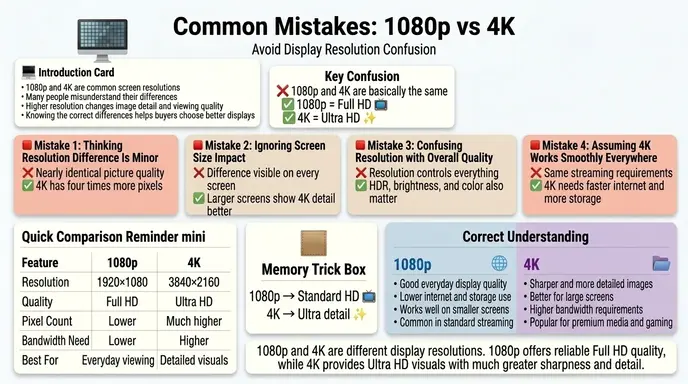
| Mistake | Why It Is Wrong | Correct Understanding |
| Thinking 4K always looks better | Screen size matters | Difference depends on viewing conditions |
| Ignoring internet speed | 4K needs more bandwidth | Slow internet reduces quality |
| Assuming all 4K content is true 4K | Some content is upscaled | Native 4K is sharper |
| Believing 1080p is outdated | Full HD still works well | Many users still prefer 1080p |
| Forgetting hardware requirements | 4K gaming is demanding | Strong GPUs are important |
How Search Engines Understand “Difference Between 1080p and 4K”
Search engines like Google recognize that users searching this topic usually want help with buying decisions.
Common searches include:
- 1080p vs 4K
- is 4K worth it
- best resolution for gaming
- 4K vs Full HD
- should I buy a 4K TV
Google prioritizes articles that:
- explain technical concepts simply
- compare real world performance
- include visual clarity explanations
- answer beginner confusion
- help users make decisions
Platforms like YouTube and Netflix also optimize their systems for 4K because higher quality content increases user engagement and watch time.
Expert Insight: Is 4K Really Worth It in 2026?
In practical use, 4K is worth it for many users, but not everyone needs it.
For example:
- casual users may be perfectly happy with 1080p
- gamers may prefer 1080p for higher FPS
- movie lovers often benefit greatly from 4K
- professional creators usually prefer 4K workflows
Most beginners focus only on resolution numbers. Professionals also consider:
- refresh rate
- HDR support
- color accuracy
- panel quality
- viewing distance
A good 1080p display can sometimes look better than a poor quality 4K display.
Can You Watch 1080p Content on a 4K TV?
Yes. Modern 4K TVs upscale lower resolution content automatically.
Upscaling improves image appearance, but native 4K content still looks sharper.
Is 4K Better for Gaming?
Yes and no.
Advantages of 4K Gaming
- sharper graphics
- better textures
- cinematic visuals
Advantages of 1080p Gaming
- higher frame rates
- smoother performance
- lower hardware requirements
Competitive gamers often prefer 1080p because FPS matters more than resolution.
FAQ:
What is the main difference between 1080p and 4K?
4K has four times more pixels than 1080p, producing sharper and more detailed images.
Is 4K better than 1080p?
Yes, in image quality and detail. However, 1080p may still be better for budget setups and high FPS gaming.
Can the human eye see the difference between 1080p and 4K?
Yes, especially on larger screens and at closer viewing distances.
Does 4K use more internet?
Yes. Streaming 4K content requires significantly more bandwidth.
Is 1080p outdated in 2026?
No. Full HD remains widely used for gaming, streaming, laptops, and budget devices.
Is 4K worth it for gaming?
It depends on your hardware and priorities. Competitive gamers often prefer 1080p, while cinematic gamers may prefer 4K.
Why are 4K TVs cheaper now?
4K manufacturing has become more common, reducing prices over time.
Can YouTube stream in 4K?
Yes. YouTube supports native 4K streaming on compatible devices and internet connections.
Conclusion
Understanding the difference between 1080p and 4K helps people choose the right display for gaming, streaming, work, and entertainment.
1080p offers solid Full HD quality, lower hardware requirements, smaller file sizes, and affordable pricing. 4K provides much sharper visuals, more detail, and a premium viewing difference-between-1080p-and-4kthanks to its much higher pixel count.
In simple words:
- 1080p is practical and efficient
- 4K is sharper and more immersive
The best choice depends on your screen size, internet speed, viewing habits, and budget.
For many users in 2026, 4K has become the new premium standard, but 1080p still remains an excellent option for everyday use.
Discover more Articles!
Difference Between Piano and Keyboard (Simple Music Guide)
Difference Between BA and BFA (Simple Career & Degree Guide)

labdiff.com is my English grammar comparison website where I simplify confusing words, spelling differences, and usage rules through clear explanations and examples. My goal is to help learners, writers, and students understand English easily and use correct grammar with confidence.