Many beginners in computers and technology get confused about the difference between bits and bytes.
The terms look similar, sound similar, and are both used to measure digital data. However, they are not the same thing.
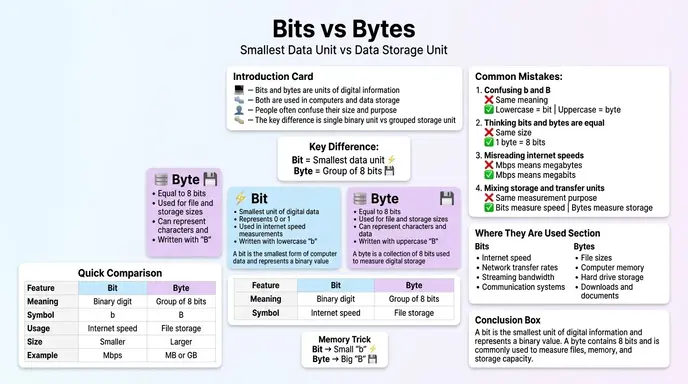
The difference between bits and bytes is simple: a bit is the smallest unit of digital information, while a byte is a group of 8 bits.
Bits are mainly used to measure internet speed and data transfer rates, while bytes are used to measure file sizes and storage capacity.
For example:
- Internet speed may be shown as 100 Mbps
- A file size may be shown as 100 MB
Even though both use similar letters, the meanings are completely different.
Many users search for the difference between bits and bytes when buying internet plans, SSDs, RAM, cloud storage, or understanding computer performance. In this guide, you will learn:
- What bits and bytes mean
- Key differences between them
- Real life examples
- Storage vs internet speed confusion
- Common mistakes
- How search engines and systems understand digital units
By the end, you will clearly understand the difference between bits and bytes without confusion.
Quick Answer: Difference Between Bits and Bytes
The difference between bits and bytes is that a bit is a single binary value (0 or 1), while a byte contains 8 bits.
Simple Example
- bit (b) = smallest digital unit
- byte (B) = 8 bits together
In practical use:
- Internet speed uses bits
Example: 100 Mbps - File size uses bytes
Example: 100 MB
A capital “B” and lowercase “b” make a huge difference.
Definition of Bits and Bytes
What Is a Bit?
A bit is the smallest unit of digital data in computing. It can only have two values:
- 0
- 1
Computers use bits to process and transfer information.
Example
A simple on/off signal inside a computer system.
What Is a Byte?
A byte is a group of 8 bits combined together. Bytes are used to store characters, files, images, videos, and applications.
Example
One typed letter like “A” usually takes one byte of storage.
Pronunciation of Both Terms
| Word | US Pronunciation | UK Pronunciation |
| Bit | bit | bit |
| Byte | bite | bite |
Now let’s understand the deeper difference between bits and bytes in real world technology.
Comparison Table: Difference Between Bits and Bytes
| Feature | Bit | Byte |
| Full Form | Binary digit | Group of 8 bits |
| Symbol | b | B |
| Size | Smallest data unit | Larger storage unit |
| Values | 0 or 1 | 8 binary values combined |
| Usage | Internet speed, networking | Storage, files, memory |
| Example | Mbps, Gbps | MB, GB, TB |
| Measurement Type | Data transfer rate | Data storage capacity |
| Common Devices | Routers, networks | SSDs, hard drives, RAM |
| Processing Role | Basic signal level | Readable data unit |
Key Differences Explained Between Bits and Bytes
A Bit Is Smaller Than a Byte
A bit is the smallest possible unit of information in digital systems.
A byte is made by combining 8 bits together.
Simple Formula
1\ \text{Byte} = 8\ \text{Bits}
This is the most important difference beginners should remember.
Bits Are Used for Internet Speed
Internet providers usually measure speed using bits.
Examples
- Mbps = Megabits per second
- Gbps = Gigabits per second
When your internet says “100 Mbps,” it means 100 megabits, not megabytes.
This is why downloads may appear slower than expected.
Bytes Are Used for Storage
Bytes measure how much data can be stored.
Examples
- KB = Kilobyte
- MB = Megabyte
- GB = Gigabyte
- TB = Terabyte
Devices from Apple, Samsung, and Microsoft use bytes to describe storage space.
Capital Letters Matter
One of the biggest beginner mistakes is ignoring uppercase and lowercase letters.
Example
- Mb = Megabits
- MB = Megabytes
These are completely different measurements.
Bytes Are Easier for Humans to Understand
Bytes organize data into usable chunks.
For example:
- text files
- images
- videos
- software applications
All are stored in bytes because humans need larger readable units.
Bits Are Faster for Networking Calculations
Networking systems use bits because data transmission happens at the binary signal level.
Routers, modems, and servers communicate using streams of bits.
Download Speeds Often Confuse Users
Many people think a 100 Mbps internet connection should download a 100 MB file in one second.
But because:
100\ \text{Mbps} \div 8 = 12.5\ \text{MB/s}
the actual maximum speed is about 12.5 megabytes per second.
Difference and Similarity Table Between Bits and Bytes
| Feature | Bit | Byte | Similarity |
| Meaning | Single binary digit | Group of 8 bits | Both measure digital data |
| Symbol | b | B | Both use abbreviations |
| Main Use | Data transfer | Data storage | Both are computing units |
| Size | Smaller | Larger | Both represent information |
| Usage Area | Networking | File systems | Both are essential in computers |
| Speed Relation | Internet bandwidth | Download size | Both affect performance |
| Binary Role | Basic signal | Organized data block | Both rely on binary logic |
| Common Examples | Mbps, Gbps | MB, GB, TB | Both appear in technology products |
This table clearly shows the difference and similarity between bits and bytes for quick understanding.
Why People Get Confused Between Bits and Bytes
Many users confuse bits and bytes because the names are almost identical.
Another reason is that internet companies and storage manufacturers use different measurement systems.
Common Confusion
Internet Provider
“300 Mbps speed”
User Expectation
“300 MB download speed”
But these are not the same.
Modern platforms YouTube, and cloud services rely heavily on both bits and bytes:
- streaming speed uses bits
- video storage uses bytes
What Causes the Difference Between Bits and Bytes?
Binary Computing System
Computers work using binary code:
- 0
- 1
Each 0 or 1 is a bit.
Groups of bits create larger usable data structures called bytes.
Digital Communication Needs
Networks transmit tiny electrical or wireless signals rapidly, so bits work best for measuring transmission speed.
Storage Organization
Operating systems organize files into bytes because larger units are easier to manage.
Real Life Examples With Bits and Bytes
Internet Speed Example
Bits
A Wi Fi plan showing:
- 500 Mbps
This measures transfer speed.
File Storage Example
Bytes
A movie file showing:
- 5 GB
This measures storage size.
Gaming Example
Bits
Online multiplayer games rely on Mbps or Gbps for low latency communication.
Bytes
Game installation files may require 100 GB of storage.
Cloud Storage Example
Services like Google Drive and Dropbox measure storage using bytes.
Streaming Example
Netflix uses:
- bits for streaming bandwidth
- bytes for downloaded content size
When to Use Each Term Correctly
Use “Bits” When Talking About:
- internet speed
- bandwidth
- network transfer rates
- communication systems
Examples
- Mbps
- Gbps
- Kbps
Use “Bytes” When Talking About:
- storage
- files
- RAM
- SSDs
- hard drives
Examples
- MB
- GB
- TB
Common Mistakes With Bits and Bytes
| Mistake | Why It Is Wrong | Correct Understanding |
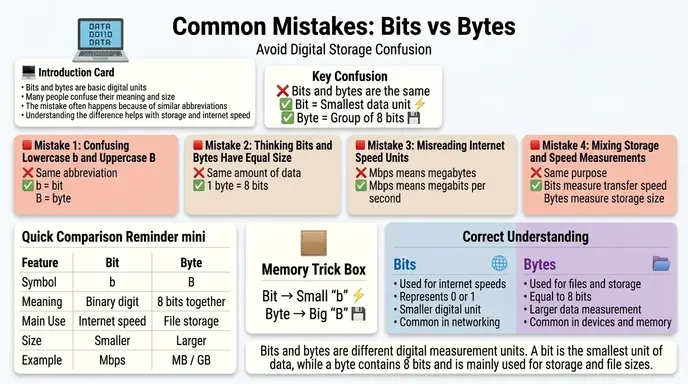
| Thinking bit and byte are the same | They represent different sizes | 1 byte = 8 bits |
| Ignoring uppercase letters | b and B are different | Mb ≠ MB |
| Expecting internet speed to match file size numbers | Internet uses bits | Storage uses bytes |
| Assuming Mbps means MB/s | They are different units | Divide by 8 for conversion |
| Confusing download speed with storage space | One measures transfer, one measures capacity | Context matters |
How Search Engines Understand “Difference Between Bits and Bytes”
Search engines like Google recognize that users searching this topic usually want beginner friendly technical explanations.
Common searches include:
- bits vs bytes
- Mbps vs MBps
- internet speed meaning
- byte size explained
- what is a bit in computing
Google’s ranking systems prioritize articles that:
- explain technical concepts simply
- include tables and examples
- answer real user confusion
- use semantic relationships naturally
- improve educational clarity
Technology companies also optimize help content around bits and bytes because users frequently misunderstand download speeds and storage limits.
Expert Insight: Why This Difference Matters in Real Life
In practical use, understanding bits and bytes can save people from making expensive mistakes.
For example:
- buying the wrong internet package
- misunderstanding cloud storage limits
- expecting unrealistic download speeds
- purchasing insufficient SSD storage
Most beginners only notice the numbers. Professionals focus on the units.
A “1 Gbps internet connection” and a “1 GB file” are related but not equivalent measurements.
That small lowercase or uppercase letter completely changes the meaning.
Can Bits and Bytes Be Converted?
Yes. Conversion is simple.
Basic Conversion Formula
\text{Bytes} = \frac{\text{Bits}}{8}
Example
- 80 bits = 10 bytes
- 800 Mbps ≈ 100 MB/s
Is a Byte Always 8 Bits?
In modern computing, yes. A byte is standardized as 8 bits.
Historically, some older systems used different byte lengths, but modern computers universally use 8 bit bytes.
FAQ:
What is the main difference between bits and bytes?
A bit is the smallest unit of digital information, while a byte contains 8 bits.
Why does internet speed use bits?
Networks transfer data as binary signals, so bits are more suitable for measuring transmission speed.
Why does storage use bytes?
Bytes are larger and easier for humans to use when measuring files and storage devices.
Is MB bigger than Mb?
Yes. MB (megabyte) is larger than Mb (megabit).
How many bits are in one byte?
One byte contains 8 bits.
Why are download speeds slower than advertised?
Internet providers advertise speeds in bits, while downloads are often displayed in bytes.
Are bits used inside computers?
Yes. Computers process all information using binary bits internally.
Which is more important: bits or bytes?
Both are important because they serve different purposes in computing and networking.
Conclusion
Understanding the difference between bits and bytes is essential in modern technology because both terms appear everywhere internet plans, cloud storage, gaming, smartphones, streaming services, and computer hardware.
A bit is the smallest unit of digital information and is mainly used for measuring data transfer speeds. A byte contains 8 bits and is used for measuring file sizes and storage capacity.
In simple words:
- bits measure speed
- bytes measure storage
This small difference explains why internet speeds and download sizes often seem confusing to beginners.
Once you understand the role of lowercase “b” and uppercase “B,” the difference between bits and bytes becomes much easier to recognize in real world technology.
Discover More Articles!
Difference Between BA and BFA (Simple Career & Degree Guide)
Difference Between Impulsive and Compulsive: Simple Examples

James Whitmore. Labdiff.com is my english grammar comparision website. I explore the history and evolution of English words. I write detailed comparisons explaining why spellings change over time and how British and American English diverged. My articles add depth and credibility to grammar comparison topics.