Many people search for the difference between HDMI and DisplayPort when buying a monitor, gaming PC, graphics card, TV, or laptop.
Both are popular digital display interfaces that transmit video and audio, but they are designed for slightly different purposes.
Choosing the right one can affect refresh rates, gaming performance, resolution support, and overall user experience.
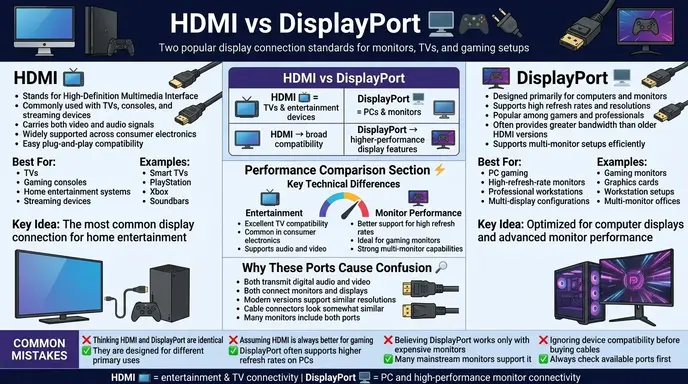
In simple words, HDMI is the most common connection for TVs, consoles, and home entertainment systems, while DisplayPort is primarily designed for computer monitors and high performance PC setups.
The difference between HDMI and DisplayPort becomes especially important for gamers, content creators, professionals, and multi monitor users.
This guide explains HDMI and DisplayPort clearly, including features, specifications, advantages, limitations, real world applications, and expert recommendations.
Quick Answer: Difference Between HDMI and DisplayPort
The main difference between HDMI and DisplayPort is their primary use case.
- HDMI (High Definition Multimedia Interface) is widely used for TVs, gaming consoles, projectors, and home entertainment devices.
- DisplayPort is designed mainly for computer monitors and offers advanced features for gaming and professional displays.
Simple Example
If you connect a PlayStation to a TV, you will most likely use HDMI.
If you connect a high refresh rate gaming monitor to a PC, DisplayPort is often the preferred choice.
Definition of HDMI and DisplayPort
- HDMI: A digital interface that transmits high definition video and audio between devices such as TVs, monitors, consoles, and media players.
- DisplayPort: A digital display interface designed primarily for computers and monitors, offering high bandwidth and advanced display capabilities.
Simple Example
- HDMI = home entertainment connection
- DisplayPort = PC display connection
Pronunciation of Both (US & UK)
| Term | US Pronunciation | UK Pronunciation |
| HDMI | H D M I | H D M I |
| DisplayPort | dis play port | dis play port |
Now let’s understand how these technologies work and where each performs best.
Difference Between HDMI and DisplayPort Comparison Table
| Feature | HDMI | DisplayPort | Similarity |
| Primary Use | TVs and entertainment devices | Computer monitors | Both transmit video and audio |
| Gaming Support | Excellent | Excellent | Both support modern gaming |
| Multi Monitor Support | Limited | Strong | Both work with monitors |
| Refresh Rates | High | Often higher at PC resolutions | Both support high refresh rates |
| Audio Transmission | Yes | Yes | Both carry audio |
| Common Devices | TVs, consoles, projectors | PCs, monitors, workstations | Both are digital interfaces |
| Connector Popularity | More widespread | Common in PCs | Both widely used |
| Daisy Chaining | No | Supported on some setups | Both support display connectivity |
This table clearly shows the difference and similarity between HDMI and DisplayPort for quick understanding.
Key Differences Explained Between HDMI and DisplayPort
Primary Purpose
The biggest difference is their target market.
HDMI was created mainly for consumer electronics.
DisplayPort was developed primarily for computer systems and professional displays.
Gaming Performance
Modern versions of both standards support:
- High refresh rates
- Variable refresh rate technologies
- HDR gaming
- High resolutions
However, DisplayPort is often preferred by PC gamers because it traditionally supports higher refresh rates at certain resolutions.
Multi Monitor Capability
DisplayPort supports Multi Stream Transport (MST), which can allow multiple monitors to connect through a single port on compatible hardware.
This makes it popular for:
- Office workstations
- Trading setups
- Professional design environments
HDMI generally requires separate connections for each monitor.
Compatibility
HDMI is found on:
- TVs
- Streaming devices
- Gaming consoles
- Soundbars
- Projectors
DisplayPort is commonly found on:
- Desktop graphics cards
- Gaming monitors
- Professional monitors
- Workstations
Connector Availability
Most televisions include HDMI.
Many PC monitors include both HDMI and DisplayPort.
Graphics cards from companies like NVIDIA and AMD commonly provide multiple DisplayPort outputs alongside HDMI.
Why Do HDMI and DisplayPort Exist?
As display technology evolved, different industries developed different connection standards.
HDMI became the standard for consumer entertainment because it simplified video and audio connections.
DisplayPort was created to address the needs of computer users requiring:
- Higher bandwidth
- Multiple displays
- Professional workflows
- Advanced monitor features
Today both standards coexist because they serve slightly different audiences.
How HDMI Works
Single Cable Convenience
HDMI carries:
- Video
- Audio
- Control signals
through a single cable.
Entertainment Focus
HDMI is widely used for:
- Home theaters
- Smart TVs
- Streaming devices
- Gaming consoles
Companies such as Sony and Microsoft use HDMI extensively in gaming systems.
Consumer Friendly Design
HDMI became popular because it replaced multiple analog cables with a single digital connection.
How DisplayPort Works
High Bandwidth Design
DisplayPort was designed to support:
- High resolutions
- Fast refresh rates
- Professional displays
Multi Monitor Support
DisplayPort can simplify multi display setups through compatible hardware configurations.
PC Centric Features
Many advanced monitor features were initially introduced through DisplayPort before becoming common in HDMI standards.
Difference Between HDMI and DisplayPort for Gaming
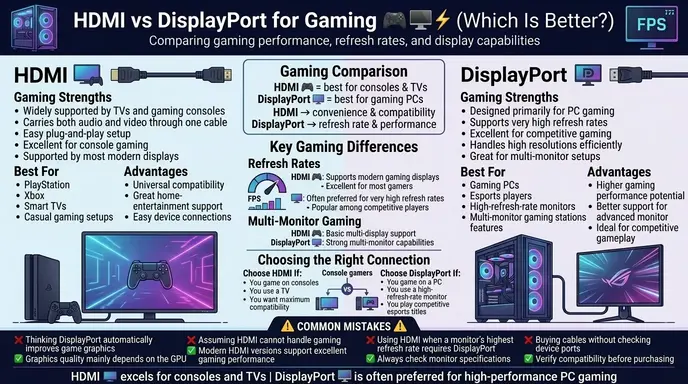
HDMI Gaming Advantages
- Broad compatibility
- Works with TVs and consoles
- Easy setup
DisplayPort Gaming Advantages
- Excellent monitor support
- Strong PC gaming performance
- Multi monitor flexibility
Competitive Gaming
Many esports players favor DisplayPort when using high refresh rate monitors because of its strong PC ecosystem support.
🎮 HDMI or DisplayPort for Gaming 144Hz and 4K Displays
One of the most common questions among gamers is: Which is better HDMI or DisplayPort for gaming?
The answer depends on your monitor, graphics card, and desired refresh rate.
HDMI or DisplayPort for Gaming 144Hz?
For many modern gaming monitors, both HDMI and DisplayPort can support 144Hz. However, DisplayPort has traditionally been the preferred choice for PC gaming because it offers excellent compatibility with high refresh rate monitors and advanced gaming features.
HDMI or DisplayPort for 4K Gaming?
When it comes to 4K gaming, both standards are capable of delivering outstanding image quality. The best option depends on the specific HDMI or DisplayPort version supported by your hardware.
DisplayPort vs HDMI Color Difference
Many users wonder if there is a noticeable color difference between HDMI and DisplayPort. In real-world use, image quality and color accuracy are generally determined by the monitor, graphics card, and display settings rather than the connection type itself.
If identical settings are used, the color difference between HDMI and DisplayPort is usually minimal or nonexistent for most users.
Difference Between HDMI and DisplayPort for Laptop Users
Modern laptops often include HDMI because of its broad compatibility with TVs, projectors, and external displays.
Some high performance laptops also include DisplayPort connectivity through dedicated ports or USB-C DisplayPort Alt Mode.
For everyday productivity, either connection works well. For gaming, content creation, and high-refresh rate external monitors, DisplayPort may provide additional flexibility depending on the hardware configuration.
Difference Between HDMI and DisplayPort for Monitors
| Monitor Feature | HDMI | DisplayPort |
| Office Use | Excellent | Excellent |
| Gaming Monitors | Good | Excellent |
| Multi Monitor Setups | Limited | Strong |
| Professional Workstations | Good | Excellent |
| TV Connectivity | Excellent | Less common |
Both standards work well, but DisplayPort often offers more flexibility for advanced monitor users.
Real Life Examples with HDMI and DisplayPort
Gaming PC
A gaming PC connected to a 240Hz monitor often uses DisplayPort.
PlayStation or Xbox
Most modern consoles connect through HDMI.
Smart TV
HDMI is the standard connection method.
Professional Editing Setup
Video editors frequently use DisplayPort for multiple high resolution monitors.
Office Workstation
Many business environments use DisplayPort because of its multi monitor capabilities.
Difference + Similarity Between HDMI and DisplayPort
| Feature | HDMI | DisplayPort | Similarity |
| Digital Video | Yes | Yes | Both deliver digital video |
| Audio Support | Yes | Yes | Both carry audio |
| Gaming Support | Excellent | Excellent | Both support modern gaming |
| High Resolution | Yes | Yes | Both support 4K and beyond |
| Common Usage | Entertainment devices | Computer displays | Both connect screens |
| Modern Relevance | Very high | Very high | Both remain industry standards |
This table clearly shows the difference and similarity between HDMI and DisplayPort for quick understanding.
Why People Get Confused Between HDMI and DisplayPort
Similar Appearance
Both cables serve similar functions and often appear together on monitors.
Shared Features
Both support:
- Audio
- Video
- High resolutions
- Gaming technologies
Marketing Language
Manufacturers frequently advertise similar capabilities for both standards.
Rapid Technology Updates
New HDMI and DisplayPort versions continue narrowing performance differences.
Common Mistakes with HDMI and DisplayPort
| Mistake | Correct Understanding |
| Assuming DisplayPort always looks better | Display quality depends on hardware and settings |
| Thinking HDMI is outdated | Modern HDMI standards remain highly advanced |
| Believing only gamers need DisplayPort | Professionals benefit too |
| Assuming TVs use DisplayPort commonly | HDMI dominates television markets |
| Ignoring cable version differences | Version matters for performance |
Quick Memory Tip
- HDMI = TV and entertainment focus
- DisplayPort = PC and monitor focus
When to Use Each
Use HDMI When:
- Connecting TVs
- Using gaming consoles
- Setting up home theaters
- Connecting projectors
Use DisplayPort When:
- Using gaming monitors
- Building multi monitor setups
- Creating professional workstations
- Connecting high performance PCs
Many modern monitors support both, giving users flexibility.
Why People Get Confused Between HDMI and DisplayPort
Both Carry Audio and Video
Their core functions are nearly identical.
Similar Modern Performance
Recent versions of both standards support impressive resolutions and refresh rates.
Device Compatibility Overlap
Many monitors include both connection types.
Gaming Discussions
Online gaming communities frequently debate which standard is better, creating confusion for beginners.
Expert Insight
In real world use, the best choice often depends more on your device than on the cable itself. For most users, HDMI provides everything needed for TVs, consoles, streaming devices, and general computing.
However, DisplayPort remains highly valued in PC gaming, professional content creation, and multi monitor environments because of its strong computer focused feature set.
Most beginners focus only on resolution numbers, but professionals also consider refresh rate support, monitor configurations, GPU compatibility, and future upgrade flexibility.
In many modern setups, both HDMI and DisplayPort deliver excellent image quality, making device compatibility the deciding factor rather than raw visual performance.
❓ Common Questions About HDMI and DisplayPort
Which Is Better HDMI or DisplayPort?
Neither standard is universally better. HDMI is generally the preferred choice for TVs, gaming consoles, streaming devices, and home entertainment systems. DisplayPort is often favored for gaming PCs, professional workstations, and multi-monitor setups.
Can HDMI Support 144Hz?
Yes. Modern HDMI standards can support 144Hz on compatible displays and hardware. The exact refresh rate depends on the HDMI version, monitor specifications, and display resolution being used.
What Are the Disadvantages of DisplayPort?
While DisplayPort offers excellent performance, it has a few limitations:
- Less common on televisions
- Lower adoption in home entertainment systems
- Some devices may require adapters for compatibility
- Not all monitors support daisy chaining
Is DisplayPort the Same Quality as HDMI?
For most users, image quality is effectively the same when comparable versions and settings are used. Resolution support, refresh rates, HDR capabilities, and monitor quality often have a greater impact on visual performance than the connector itself.
Difference Between HDMI and DisplayPort Reddit Discussions
Online communities frequently discuss the difference between HDMI and DisplayPort Reddit users experience in real-world setups.
While opinions vary, most experienced users recommend choosing the connection that best matches your monitor, graphics card, and intended use case rather than focusing solely on the cable type.
Difference Between HDMI and DisplayPort Cable
The difference between HDMI and DisplayPort cable technology primarily comes down to connector design, supported features, and intended ecosystem. Both are digital interfaces capable of transmitting high quality audio and video signals.
Frequently Asked Questions
What is the main difference between HDMI and DisplayPort?
HDMI is primarily designed for consumer electronics, while DisplayPort is optimized for computer displays and professional monitor setups.
Is DisplayPort better than HDMI for gaming?
For PC gaming, DisplayPort is often preferred, especially for high refresh rate monitors.
Can HDMI support 4K?
Yes. Modern HDMI versions support 4K and higher resolutions.
Does DisplayPort carry audio?
Yes. DisplayPort can transmit both audio and video.
Why do TVs use HDMI instead of DisplayPort?
HDMI became the dominant standard for consumer entertainment devices.
Is image quality different between HDMI and DisplayPort?
When using equivalent standards and settings, image quality is generally similar.
Can I use adapters between HDMI and DisplayPort?
Yes. Many adapters and cables support conversion between the two standards.
Which is better for multiple monitors?
DisplayPort is usually better because of its advanced multi monitor support.
Conclusion
Understanding the difference between HDMI and DisplayPort helps you choose the right connection for your setup.
HDMI is the dominant standard for TVs, gaming consoles, streaming devices, and home entertainment systems, while DisplayPort is primarily designed for computer monitors, gaming PCs, and professional workstations.
Although both standards support high quality audio and video transmission, DisplayPort often provides greater flexibility for multi monitor environments and advanced PC gaming configurations. HDMI, meanwhile, remains the most widely compatible option across consumer electronics.
For most users, the best choice depends on the devices being connected. If you’re using a TV or console, HDMI is usually the ideal solution.
If you’re building a gaming PC or professional workstation, DisplayPort may offer additional advantages.
Understanding these differences ensures better performance, compatibility, and future upgrade flexibility.
Discover More Articles!
Difference Between Anesthetist and Anesthesiologist: Explained
Difference Between Dressing and Stuffing:With Examples

labdiff.com is my English grammar comparison website where I simplify confusing words, spelling differences, and usage rules through clear explanations and examples. My goal is to help learners, writers, and students understand English easily and use correct grammar with confidence.