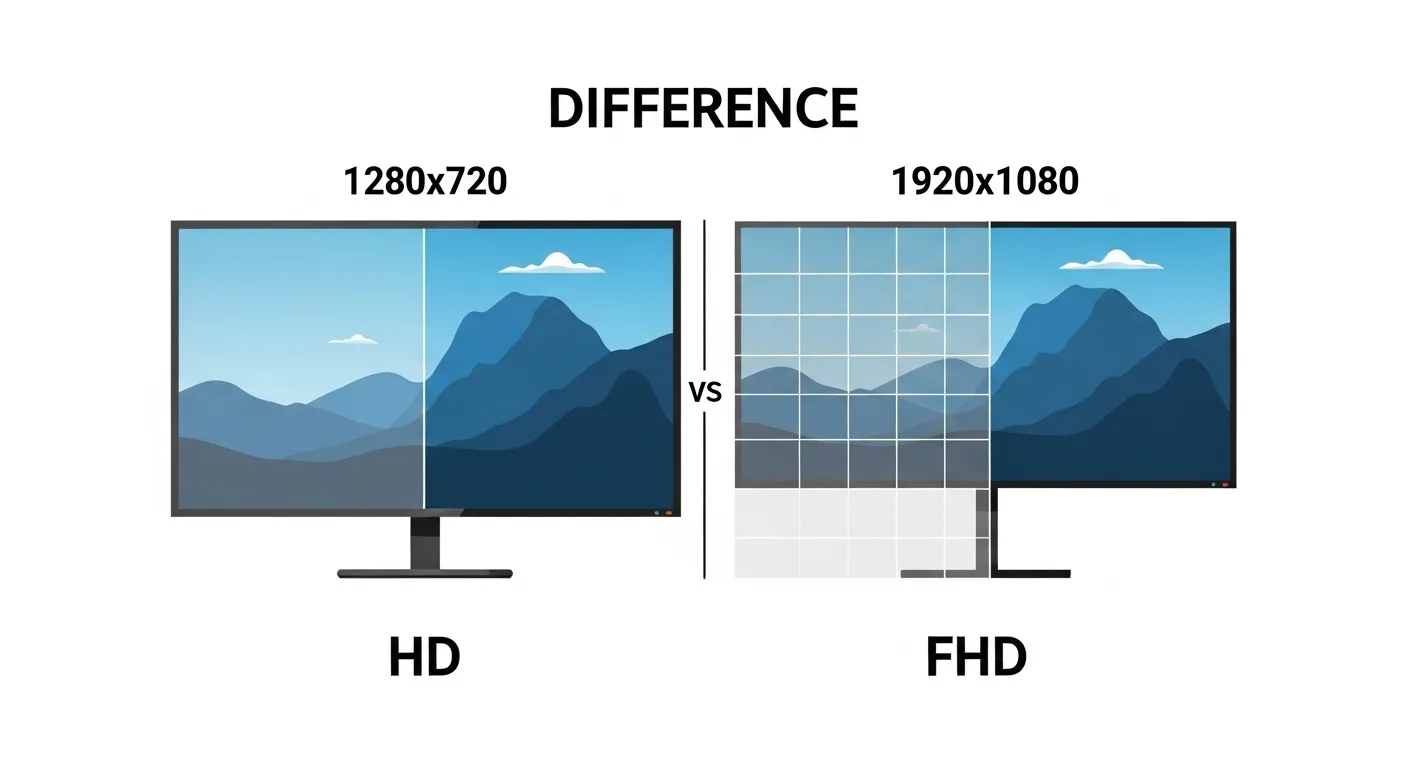
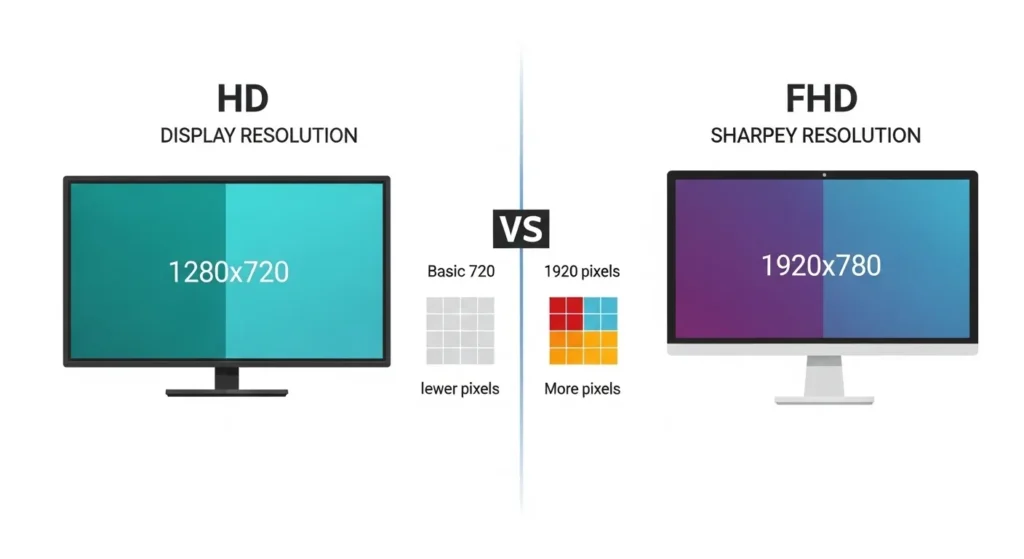
FHD (Full HD) has a higher resolution (1920×1080) and sharper image quality, while HD (typically 1280×720) has lower resolution and less detail.
Screens are part of daily life. We use them on TVs, phones, laptops, and tablets. The picture we see on a screen is made of very small dots. These dots are called pixels. More pixels mean a clearer picture.
Two common screen types are HD vs FHD. Many people see these terms when buying a TV or laptop. The names look similar. Because of this, people often think they mean the same thing.
But they are not the same. HD or FHD have different numbers of pixels. This means the picture quality is also different.
HD stands for High Definition. FHD stands for Full High Definition. FHD has more pixels than HD. Because of this, the image looks sharper and clearer.
Both types are used in modern devices. Many TVs and laptops support one of these resolutions.
Knowing the difference helps people choose the right screen for watching movies, gaming, studying, or working.
In simple words, HD gives good picture quality, but FHD gives a sharper and clearer picture.
📖 Definitions
📺 Definition of HD
HD means High Definition. It is a screen resolution. The screen shows 1280 pixels across and 720 pixels down. This is often called 720p.
HD screens give better picture quality than old TVs. Colors look better. Images look clearer.
Many small TVs and basic laptops use HD screens. These screens work well for simple tasks.
People use HD screens for watching videos, browsing the internet, and doing school work.
HD screens also use less internet data when streaming videos. This makes them useful where internet speed is slower.
Example:
A small television with 720p resolution is an HD TV.
🖥️ Definition of FHD
FHD means Full High Definition. It is a higher screen resolution. The screen shows 1920 pixels across and 1080 pixels down. This is called 1080p.
FHD has more pixels than HD. Because of this, the picture looks sharper and clearer.
Many modern TVs, laptops, and monitors use FHD screens. These screens are good for movies, games, and clear text.
FHD is now very common in digital devices.
It gives a better viewing experience than HD.
Example:
A computer monitor with 1920 × 1080 resolution is an FHD display.
🔍 Key Differences Between HD and FHD
1️⃣ Scope
HD:
HD is a basic high-definition screen.
It improves picture quality compared to older displays.
FHD:
FHD is a higher-quality display.
It gives sharper and clearer images.
2️⃣ Purpose
HD:
HD improves video quality compared to old TVs.
It is good for simple viewing.
FHD:
FHD is made for better visual detail.
It is great for movies, games, and clear images.
3️⃣ Process / Structure
HD:
HD uses 1280 × 720 pixels.
This means the screen has fewer pixels.
FHD:
FHD uses 1920 × 1080 pixels.
This means the screen has many more pixels.
More pixels mean more detail.
4️⃣ Usage
HD:
HD screens are used in small TVs and basic devices.
They are also used in budget laptops.
FHD:
FHD screens are used in modern TVs and monitors.
They are also common in gaming screens and laptops.
5️⃣ Origin
HD:
HD came when TV technology improved.
It replaced old low-quality displays.
FHD:
FHD came later.
It was created to improve picture clarity.
6️⃣ Method / Preparation
HD:
HD shows video with 720 lines of resolution.
Images look clear but not very detailed.
FHD:
FHD shows video with 1080 lines of resolution.
Images look sharper and more detailed.
7️⃣ Size or Form
HD:
HD works well on smaller screens.
On small screens the picture still looks clear.
FHD:
FHD works well on larger screens.
The extra pixels keep the picture sharp.
8️⃣ Cultural Role
HD:
HD helped improve TV picture quality.
It made digital video more common.
FHD:
FHD became the modern standard for video.
Many movies and games use this resolution.
9️⃣ Examples
HD Examples:
720p television
Basic laptop screen
Budget tablet display
Small portable TVs
FHD Examples:
1080p smart television
Gaming monitor
Laptop display
Desktop computer monitor
🔟 Key Difference Summary
HD:
Resolution is 1280 × 720 pixels.
Picture quality is good but basic.
FHD:
Resolution is 1920 × 1080 pixels.
Picture quality is sharper and clearer.
🏁 Conclusion
FHD and HD are two types of screen resolutions. They describe how clear a picture looks on a display. The difference between them mainly comes from the number of pixels on the screen.
HD has a resolution of 1280 × 720 pixels. This means the screen has fewer pixels. The picture quality is still good.
Many small TVs and budget laptops use HD displays. They work well for simple tasks like watching videos, reading text, or browsing the internet.
FHD, or Full High Definition, has a higher resolution of 1920 × 1080 pixels. This means the screen has many more pixels.
Because of this, images look sharper and clearer. Text looks easier to read. Videos and games look more detailed.
Another difference is the viewing experience. On a small screen, the difference may not be very noticeable. But on a larger screen, FHD looks much clearer than HD.
Today, many modern TVs, laptops, and monitors use FHD resolution. It offers a good balance between image quality and performance.
In simple words, HD gives a clear picture, but FHD gives a sharper and more detailed picture. Understanding this difference helps people choose the best screen for their needs.
Discover More Articals!
⚡ Difference Between Ground and Neutral: Complete Guide
🏢 Difference Between Corporation and Company: Simple and Clear Guide
🛠️ Difference Between Steel and Metal: Simple Guide

labdiff.com is my English grammar comparison website where I simplify confusing words, spelling differences, and usage rules through clear explanations and examples. My goal is to help learners, writers, and students understand English easily and use correct grammar with confidence.